Showing posts with label HTML/CSS. Show all posts

Google Font API offers free custom fonts

Did you know, Google's new Font API lets you display text on your web page with custom fonts served from their server farm? (Thanks Chris)

There are currently 19 fonts, some with multiple variations, in the Google Font Directory. Their site informs that all fonts in the directory are available for use on your website under an open source license and are served by Google servers. You can use CSS or JavaScript to embed them. There is a Font previewing tool to fine tune how the letters should look.

This program is in beta & it is supported mostly on newer versions of popular browsers.

Read More
HOW TO prevent Google from indexing or caching a specific page

HOW TO prevent Google from indexing or caching a specific page

Did you know, you can prevent Google from indexing & caching specific pages of your website by just adding a META tag to those pages?

As explained on the Google blog.....

In addition to the robots.txt file -- which allows you to concisely specify instructions for a large number of files on your web site -- you can use the robots META tag for fine-grain control over individual pages on your site. To implement this, simply add specific META tags to HTML pages to control how each individual page is indexed. Together, robots.txt and META tags give you the flexibility to express complex access policies relatively easily.

To prevent a webpage from showing up in the search results, you can insert this line within HEAD tags:
<meta content="NOINDEX" name="GOOGLEBOT">

Add the NOARCHIVE tag to a web page and Google won't cache copy of a web page in search results :
<meta content="NOARCHIVE" name="GOOGLEBOT">
As a result of the above line, that web-page will appear in a search result but the Cached link that typically appears in a search result will not be shown.

Also see:
HOW TO find "dofollow" blogs/websites
rel="nofollow" - one non-standard HTML attribute value that the Big 3 search engines support
90
Read More

CSS Attribute selector input[type="checkbox"] works inconsistently

A web developer posted a question on the ASP.NET Forums wanting to know why a CSS style setting involving the attribute selector input[type="checkbox"] wouldn’t work.

As per the Quirksmode browser compatibility table, attribute selectors should work on popular browsers except on IE versions older than 7 but the selector input[type="checkbox"] seems to be an exception.

I created a test page by adapting a sample from W3Schools, adding a CSS attribute selector style setting to be applied to all checkboxes on a web page.
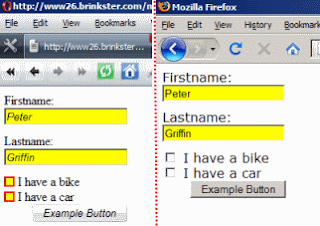


I found that the style  involving that attribute selector was applied only in IE version 7, 8 & Opera ( I tested in Opera 9.64). It failed in Safari, Firefox & Chrome.

While the style setting for input[type="text"] in the example appears correctly on all browsers, it was surprising that the style defined with the selector input[type="checkbox"] is not recognized by some browsers.

Also see:
HOW TO access a HTML Label tag's text programmatically
Conditional comments & CSS child selector
90
Read More
HTML5 features emerging in popular web apps

HTML5 features emerging in popular web apps

Work in progress...

Related:
Get ready for HTML5
Read More

Sitepoint CSS Video Tutorials Giveaway

Sitepoint is giving away the video tutorials of it's CSS Crash Course. The offer ends today so grab those videos right away.

They take your email address to send you the Order Id which you'll need before you can start downloading. In case, you have trouble logging in with the email address & Order Id credentials, write to their Customer Support.

Here's what's in the nearly two and half hour tutorial -
  • An Introduction to CSS (17:40)
  • Videos 1 & 2: CSS Selectors (40:56)
  • Videos 3 & 4: Text Properties (35:41)
  • Video 5: Inheritance (13:10 mins)
  • Video 6: The Cascade (25:21 mins)
  • Video 7: What’s Next? (12:45 mins)


CSS is a very powerful but vastly under-rated technology. This tutorial is a good resource for web developers.

Also see:
My favorite Developer Cheat-Sheets
60
Read More
Get ready for HTML5

Get ready for HTML5

The upcoming versions of all browsers are busy implementing HTML5 features. Chrome & Safari 4 already have lead over the rest.

Some of the most notable new additions in HTML5 are the video tag that will let videos to be displayed directly in the browser without having to rely on plugins and Offline Storage. YouTube has a preview of it's HTML5 Video Player.

Web developers can benefit from proactively understanding & planning on incorporating HTML5 features in their websites. There are some good learning resources online for HTML5 -

Also see:
HOW TO disable Flash in IE and Firefox
60
Read More

jQuery is now on W3Schools

Whether you are getting started with Web development or need a good reference, W3Schools is a great online resource you can turn to. In over a decade of it's existence, the Norwegian family-owned company Refsnes Data that runs W3Schools has meticulously created tutorials on close to 50 Web development topics. The tutorials are in plain-English, thorough and to the point. I was glad to see today that jQuery has been added to that growing list of topics.  Also included is a tutorial on HTML5, the next generation of HTML.

W3Schools has been a dependable companion to me for much of my web development career. Just yesterday, I learnt that the rel attribute of the anchor tag is not really supported by any major browsers and it can take over a dozen possible values. rel="nofollow" is used by search engines to let search spiders know they should not follow a link which contains that attribute.

W3Schools is currently ranked 341 on Alexa & enjoys over 103+ million monthly page views (March 2010).

Also see:
Free .NET 4 & VS 2010 Learning Resources
HOW TO block IFRAME based ads
60
Read More
Building blazing fast Web pages

Building blazing fast Web pages

Everyone loves fast loading pages but building such pages requires care & implementing best practices. Some best practices only provide minor benefits but when put together the performance gain is significant.

Steve Souders, the author of "High Performance Web Sites", who champions the cause of building faster Web pages & thereby a better Web, shares 3 new tricks to speed up loading web pages -
  • Specify a Character Set at the very top of your HTML document - Browsers take a performance hit of varying severity when you fail to specify it. A META tag specifying the charset should ideally be the first element inside the HEAD tag.
  • Minify HTML
  • Minimize HTTP Request Size - If the total size of the request headers exceed one packet (~1500 bytes), a roundtrip is required just to submit the request thereby hurting performance.
These "rules" are now part of Google's YSlow clone, Page Speed 1.6 Beta Firefox plugin

Also see:
What is "domain sharding"
HOW TO improve the front-end performance of a website
Read More

